
A free, self-hosted AI studio with 200+ unfiltered
Open Sourceaivideoimageself-hosted
Free
Video & Animation
Free, open-source TTS tool with unique two-voice m
In the rapidly evolving landscape of AI digital media, Amphion Text-to-Speech emerges as a remarkably versatile and accessible tool for generating high-quality synthesized speech. Hosted on Hugging Face Spaces, this audio-music category application leverages the power of the open-source Amphion framework to deliver a web-based TTS experience that is completely free to use. Unlike many closed-source platforms that hide their best features behind expensive paywalls, Amphion Text-to-Speech invites users to explore advanced audio generation directly through their web browsers, requiring no complex local installations.
The true strength of this tool lies in its robust core features, which cater to both novice creators and advanced audio engineers. At its foundation, Amphion offers multiple speaker voice options, allowing users to select from a diverse roster of AI vocal profiles to best suit their project's tone. For those who need precise control over audio delivery, the platform includes an adjustable speaking rate. This feature is particularly beneficial for educators or content creators looking to match specific video timings or create accessible audio versions of written text for the visually impaired.
However, what sets Amphion Text-to-Speech apart from standard TTS utilities is its innovative two-voice mixing capability. Designed with advanced users in mind, this feature allows for the blending of two entirely different speakers into a single cohesive output. This opens up a fascinating realm of possibilities for game developers, authors, and animators who need to prototype unique character voices that do not sound like standard, off-the-shelf synthetic speech. Additionally, language learners and linguists can utilize the tool to study pronunciation and speech pacing by comparing and blending different acoustic profiles.
The web interface itself is built using the Gradio SDK and remains simple and accessible. Users simply input their text, tweak their desired settings, and let the model do the work. The primary use cases for Amphion Text-to-Speech are as diverse as its user base. It is an excellent utility for generating quick voiceovers for YouTube videos or podcasts without needing to hire voice actors. It also serves a critical role in accessibility, helping to bridge the digital divide by turning written content into easily digestible audio formats.
While the platform is undeniably powerful, it is important to note a few limitations. Because it is hosted on a free public cloud space, users may occasionally experience slower processing times during periods of high traffic. Despite this minor drawback, Amphion Text-to-Speech remains an exceptional, cost-effective solution. It stands as a testament to the power of open-source AI, offering a unique blend of standard text-to-speech functionality and advanced voice-mixing features that make it a must-try for anyone involved in digital content creation.
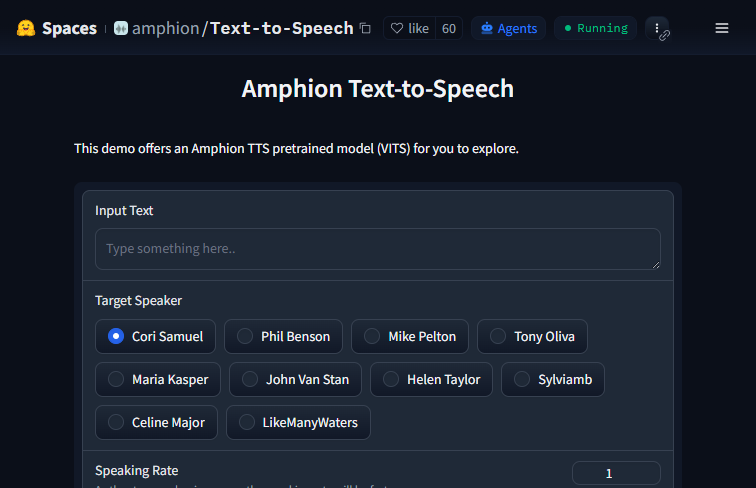 Screenshot
The application is hosted on Hugging Face Spaces and is completely free to use.
Summarized from the official site: https://huggingface.co/spaces/amphion/Text-to-Speech
Yes, Amphion Text-to-Speech is completely free to use. It is hosted on Hugging Face Spaces as a public cloud service, meaning there are no paywalls to access its features.
No, you do not need to install anything. It is a web-based application that you can access and use directly through your internet browser.
It features a unique two-voice mixing capability that allows you to blend two different speakers into a single cohesive output. This is especially useful for developers, authors, and linguists who need to create unique character voices.
Yes, the tool offers multiple speaker voice options and an adjustable speaking rate. These features allow you to select different AI vocal profiles and control the audio delivery speed to match your project's needs.
Processing times may occasionally be slower because the tool is hosted on a free public cloud space. This typically happens during periods of high user traffic on the platform.
A free, self-hosted AI studio with 200+ unfiltered

Objective, community-driven leaderboard for text-t

Optimize and secure AI coding agents with this ope

Generate highly realistic AI images from text with