
A free, self-hosted AI studio with 200+ unfiltered
Open Sourceaivideoimageself-hosted
Free
Video & Animation
In an increasingly digital world, the ability to quickly bridge the gap between physical documents and digital text is essential. The OCR-image-to-text tool, hosted on Hugging Face Spaces by pragnakalp, is a highly practical, free-to-use web application designed to do exactly that. Tailored for users needing quick and accessible text extraction, this tool serves as a versatile assistant for students, professionals, and anyone looking to digitize information. Whether you are trying to extract text from scanned documents, digitize handwritten notes, or transcribe text from photographs of printed signs and menus, this utility offers a straightforward solution.
One of the standout features of this OCR application is the power of choice it gives to the user. Instead of locking you into a single recognition model, it offers a choice of three distinct Optical Character Recognition (OCR) engines: PaddleOCR, EasyOCR, and KerasOCR. This flexibility allows users to select the engine that best suits their specific image type, ensuring optimal results. The interface itself is remarkably user-friendly, utilizing a simple drag-and-drop image upload mechanism that requires zero technical setup or coding knowledge. Once an image is uploaded and processed, the application intelligently outputs the extracted text as plain sentences, making it immediately ready for copy-pasting into reports, essays, or database systems.
For daily workflows, this tool proves incredibly valuable. It can dramatically speed up data entry tasks by automating the extraction of text from receipts, forms, and letters. Furthermore, its ability to handle both printed and handwritten text sets it apart from many basic, built-in OCR tools that often struggle with varied handwriting styles. Because it is hosted as a free and easily accessible web interface, users can access it from any device without needing to install heavy software packages.
However, like any tool reliant on interpreting visual data, it is not without its limitations. The accuracy of the extracted text may vary significantly depending on a couple of factors. First, the inherent strengths and weaknesses of the chosen OCR engine will play a role, as some models handle certain fonts or handwriting styles better than others. Second, the quality of the source image is crucial; blurry photos, poor lighting, or low-resolution scans can negatively impact the final transcription. Despite these minor limitations, the OCR-image-to-text tool remains an excellent, cost-effective resource for anyone needing reliable text extraction on demand.
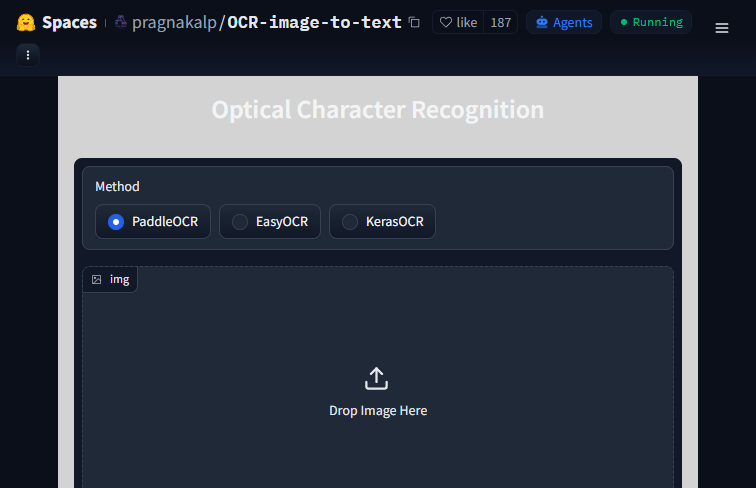 Screenshot
The application is completely free to use on the Hugging Face platform.
Summarized from the official site: https://huggingface.co/spaces/pragnakalp/OCR-image-to-text
Yes, the OCR-image-to-text tool is completely free to use. It is hosted on Hugging Face Spaces by pragnakalp as a free web application that requires no payment or software installation.
Yes, the tool supports the recognition of both printed and handwritten text. This makes it highly effective for digitizing handwritten notes, letters, and varied handwriting styles.
The tool gives you a choice of three OCR engines: PaddleOCR, EasyOCR, and KerasOCR. This flexibility allows you to select the specific engine that best suits your image type for optimal results.
No, you do not need any coding knowledge or technical setup to use this tool. It features a simple drag-and-drop image upload interface that makes uploading images incredibly easy.
The accuracy of the extracted text may vary depending on the chosen OCR engine and the quality of your source image. Blurry photos, poor lighting, low-resolution scans, and specific font styles can negatively impact the final transcription.
A free, self-hosted AI studio with 200+ unfiltered

Optimize and secure AI coding agents with this ope

Generate highly realistic AI images from text with

Integrated AI writing assistant for real-time brow