
A free, self-hosted AI studio with 200+ unfiltered
Open Sourceaivideoimageself-hosted
Free
Video & Animation
Instant, free text-to-speech conversion directly i
In the rapidly evolving landscape of digital content creation, having access to quick and efficient audio tools is essential. The text-to-speech-client hosted by Xenova on Hugging Face Spaces is a prime example of a streamlined, highly accessible utility designed to make auditory content generation easier than ever. At its core, this tool is an entirely free, browser-based application that allows users to instantly convert written text into spoken audio. Unlike traditional audio editing software or heavy downloadable programs, this platform requires no complex setup or file uploads. Users simply navigate to the web page and immediately encounter a simple text input interface. By pasting or typing the desired text into the provided field, the application leverages powerful in-browser machine learning models to process the words and deliver clear audio playback almost instantaneously. This straightforward approach to text-to-speech (TTS) makes it an ideal solution for a wide variety of users. For individuals seeking enhanced digital accessibility, it serves as an invaluable aid, allowing them to listen to written content effortlessly. Content creators and professionals who need to quickly generate voiceovers for presentations, videos, or other media will find its instant generation capabilities highly beneficial for drafting and prototyping. Furthermore, writers and editors can utilize the tool as a practical proofreading aid; hearing text read aloud is a proven method for catching awkward phrasing, repetitive words, and grammatical errors that the eyes often gloss over. While the text-to-speech-client excels in simplicity, offering an incredibly straightforward user experience right in the web browser, it is important to manage expectations regarding its overall scope. The platform intentionally lacks the advanced editing features found in full-fledged audio production suites. Users looking for multi-track editing, complex voice modulation, or granular audio exporting options will not find them here. Instead, the tool remains fiercely focused on its primary function: providing a frictionless way to turn text into sound without any technical barriers. Garnering over 129 likes on the Hugging Face platform, this static-hosted space has clearly resonated with the community due to its no-nonsense design and reliable execution. Ultimately, if you are looking for a highly accessible, free, and rapid way to bring your written words to life, Xenova's text-to-speech-client is a must-try tool that perfectly balances raw utility with unmatched convenience.
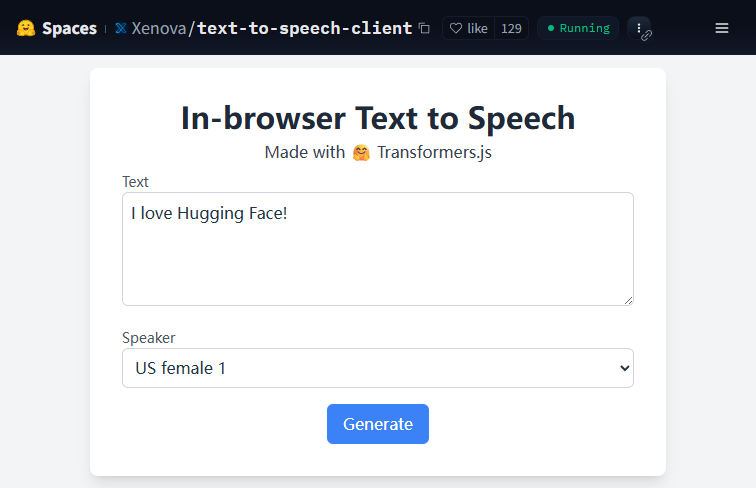 Screenshot
This application is completely free to use on the Hugging Face platform.
Summarized from the official site: https://huggingface.co/spaces/Xenova/text-to-speech-client
Yes, this application is completely free to use. It is accessible directly in your web browser on the Hugging Face platform.
It is a browser-based tool that uses in-browser machine learning models to instantly convert typed or pasted text into spoken audio. Users simply navigate to the web page and use the simple text input interface without needing any complex setup.
No, there is no complex setup or downloadable program required. Because it is entirely browser-based, you can use it directly on the web without any file uploads.
No, the platform intentionally lacks advanced editing features like multi-track editing, complex voice modulation, or granular audio exporting options. It remains strictly focused on providing instant text-to-speech conversion.
It is an ideal tool for listening to written content for digital accessibility, quickly generating voiceover drafts, and proofreading text by hearing it read aloud.
A free, self-hosted AI studio with 200+ unfiltered

Objective, community-driven leaderboard for text-t

Optimize and secure AI coding agents with this ope

Generate highly realistic AI images from text with