C
Features
Overview
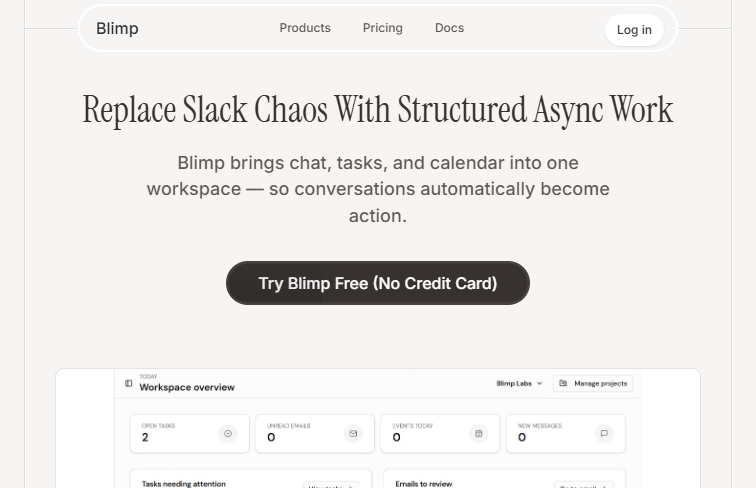
In today’s hyper-connected professional landscape, digital professionals frequently find themselves drowning in a sea of disconnected applications. Blimp (accessible at getblimpy.cloud) emerges as a compelling solution to this modern dilemma, positioning itself as an AI-native productivity suite designed to unify your digital workspace. Operating within the business category, this platform tackles the all-too-familiar problem of tool fatigue by bringing chats, emails, project management, and document collaboration under a single, cohesive roof. But Blimp is not just another amalgamation of disparate software features; it is fundamentally built around the concept of a structured asynchronous work environment, aiming to replace the constant interruptions of real-time messaging with thoughtful, organized workflows.
So, who is Blimp built for? It is ideal for modern teams, remote workers, and project managers who spend a significant portion of their day toggling between a web browser, an email client, a messaging app, and a project board. If your daily routine involves constantly shifting context and losing track of vital information scattered across different platforms, Blimp offers a much-needed centralized hub. It allows users to seamlessly track emails and calendar events right alongside ongoing project progress and daily tasks, ensuring that nothing falls through the cracks.
How it works is by creating a deeply integrated environment where various aspects of work communicate with one another natively. Instead of forcing you to switch between multiple browser tabs, Blimp consolidates team communications into an asynchronous format that encourages focused work. You can collaborate on documents and internal wikis without ever leaving the main interface. To ensure it fits smoothly into your existing digital ecosystem, Blimp offers integrations with popular tools like Slack, Notion, Trello, and Google Workspace. This means you do not necessarily have to cut ties with your favorite applications immediately; instead, Blimp acts as the ultimate connecting layer. Furthermore, its AI-native design provides built-in productivity enhancements to help streamline your daily operations.
However, adopting a comprehensive workspace like this does come with a few challenges. The primary drawback is that migrating entirely from your existing tools may require a significant onboarding effort. Teams deeply entrenched in their current workflows might find the initial transition phase a bit demanding. Despite this learning curve, the long-term benefits of reducing tool fatigue and replacing chaotic messaging with structured workflows make Blimp an incredibly promising tool for businesses looking to reclaim their focus and boost overall efficiency.
 Screenshot
Core Features
- Unified workspace for chats, emails, projects, and docs
- Structured asynchronous work environment
- AI-native productivity enhancements
- Integration with popular tools like Slack, Notion, Trello, and Google Workspace
Use Cases
- Managing daily tasks and project timelines without switching between multiple tabs
- Consolidating team communications into a structured, asynchronous format
- Tracking emails and calendar events alongside project progress
- Collaborating on documents and wikis within a centralized hub
Pricing
Pricing details are not explicitly mentioned, but it typically operates on a freemium model for productivity suites.
Pros
- Reduces tool fatigue by unifying various work applications
- Replaces chaotic messaging with structured asynchronous workflows
- AI-native design helps streamline productivity
Cons
- May require a significant onboarding effort to migrate entirely from existing tools
Frequently Asked Questions
Summarized from the official site: https://getblimpy.cloud
What is Blimp?
Blimp is an AI-native productivity suite designed to unify your digital workspace by bringing chats, emails, project management, and document collaboration into a single platform. It aims to reduce tool fatigue and replace constant real-time messaging interruptions with structured, asynchronous workflows.
What integrations does Blimp support?
Blimp integrates with popular tools like Slack, Notion, Trello, and Google Workspace. This allows it to act as a connecting layer so you don't have to immediately stop using your favorite applications.
Who is Blimp designed for?
Blimp is ideal for modern teams, remote workers, and project managers who frequently toggle between different applications. It provides a centralized hub for users who constantly shift context and lose track of information scattered across multiple platforms.
Are there any drawbacks or challenges to using Blimp?
Yes, the primary drawback is that migrating entirely from your existing tools may require a significant onboarding effort. Teams entrenched in their current workflows might find the initial transition phase to be a bit demanding.
Related Tools

Notion AI is an AI-powered productivity assistant integrated into Notion.
Text GenerationAutomation
P
CONTACT
Writing & Content

Centralized context layer for modern investment firms.
aiinvestmentcontext-layerinvestor-relations
CONTACT
Business & Productivity